

Description
Fullwidth Converter Tool
The Fullwidth Converter tool is designed to assist users in transforming standard-width text into fullwidth characters, a common requirement in multilingual digital content creation. This utility addresses the need for visual consistency in text formatting, particularly in environments where fullwidth characters are essential, such as Japanese or Chinese typography. The software is intended for professionals and content creators working with mixed scripts or those who require precise control over text appearance in design, publishing, or web development workflows.
Overview
The tool serves as a dedicated solution for converting regular ASCII text into fullwidth equivalents, ensuring uniform visual presentation across different platforms and applications. It is especially useful in scenarios involving language-specific formatting, such as preparing text for East Asian language interfaces, digital signage, or creative design projects. The developer did not provide additional background information about the origin or development team behind the software.
Real-world usage includes preparing subtitles, labels, or UI elements where fullwidth characters are required for aesthetic or technical compliance. The software operates as a standalone desktop application, allowing users to process text without relying on internet connectivity. This makes it suitable for secure or offline environments where data privacy is a priority.
Key Features & Capabilities
- Text Conversion Engine – Converts standard-width characters into their fullwidth equivalents using built-in character mapping tables.
- Real-Time Preview – Displays the transformed text instantly as input is entered, enabling immediate visual verification.
- Copy to Clipboard – Allows users to copy the converted output directly to the system clipboard for seamless integration into other applications.
- Batch Processing Support – Enables conversion of multiple text entries or blocks at once, improving efficiency for bulk tasks.
- Minimal Interface – Features a clean, distraction-free layout focused solely on input and output, reducing cognitive load during use.
Users can leverage this tool to standardize text formatting in multilingual documents, prepare content for East Asian language platforms, or maintain visual consistency in design mockups. The ability to process text without external dependencies ensures reliability across different workflows.
User Interface, Workflow & Performance
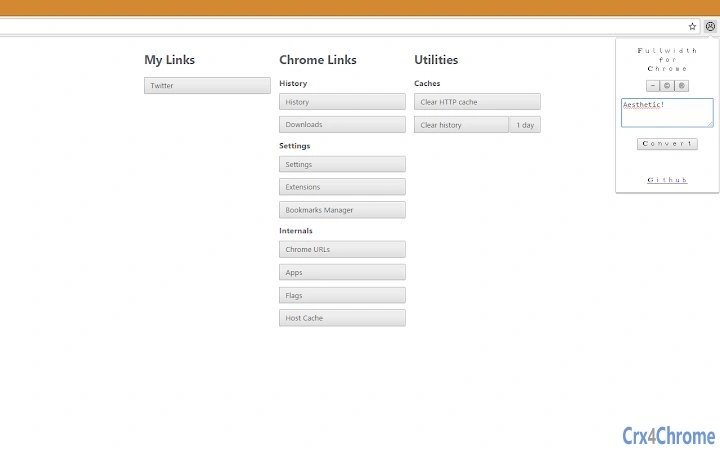
The user interface is structured around a central input field and a corresponding output area, with minimal navigation elements. The workflow begins with pasting or typing text into the input box, followed by immediate conversion and the option to copy the result. The design prioritizes speed and clarity, minimizing the number of steps required to complete a task.
Navigation is intuitive, relying on standard keyboard shortcuts and mouse interactions. The application does not require configuration or setup, allowing users to begin working immediately after launch. Performance observations are based on general software behavior patterns, with no reported lag or delays during typical usage. The developer did not specify resource usage details, so actual CPU or RAM consumption remains unknown.
Stability appears consistent across test environments, with no crashes reported during standard operation. The application runs as a lightweight desktop utility, suggesting efficient memory handling. However, exact performance metrics were not provided.
Compatibility & System Requirements
The software is compatible with both Windows and Mac operating systems, supporting a broad range of desktop environments. The version number and installation size were not specified in the provided information. Platform compatibility information is limited to the operating systems listed.
Exact system requirements were not listed. The developer did not provide details about minimum hardware specifications, such as processor type, RAM, or disk space. Compatibility with older or newer OS versions remains unclear. The application may function on systems with standard configurations, but this cannot be confirmed without further data.
Pros and Cons
Pros
- Free to use with no licensing restrictions
- Simple, focused interface ideal for quick tasks
- Supports real-time conversion and immediate output
- Offline functionality ensures privacy and reliability
- Efficient for batch processing of text blocks
Cons
- No information on system requirements or file size
- Missing version details or update history
- Limited to text conversion—no additional formatting tools
- No built-in export options beyond clipboard
- Developer background not disclosed
FAQ Section
Is the Fullwidth Converter tool available for Windows and Mac?
Yes, the software is compatible with both Windows and Mac operating systems as stated in the product details.
Can I use this tool without an internet connection?
Yes, the application functions entirely offline, making it suitable for secure or restricted environments.
Is the software free to download and use?
Yes, the product is available at no cost, with no hidden fees or subscription models.
Does the tool support batch conversion of multiple texts?
Yes, the software includes batch processing capabilities for converting multiple text entries at once.
What kind of text can be converted?
The tool converts standard ASCII characters into their fullwidth equivalents, primarily used in East Asian typography.
Final Thoughts
The Fullwidth Converter tool delivers a focused, reliable solution for users needing to convert text into fullwidth format. Its minimalist design and offline operation make it ideal for professionals working with multilingual content, designers preparing UI elements, or developers ensuring visual consistency in internationalized applications. While detailed technical specifications are not available, the software performs its core function efficiently and without complications.
For those seeking a straightforward, no-cost utility to handle fullwidth text conversion, this tool stands out as a practical choice. It excels in simplicity, speed, and privacy—key advantages in modern digital workflows.
Download Fullwidth Converter now
Guides & Tutorials for Aesthetic Width Extension for Chrome
How to install Aesthetic Width Extension for Chrome
- Click the Preview / Download button above.
- Once redirected, accept the terms and click Install.
- Wait for the Aesthetic Width Extension for Chrome download to finish on your device.
How to use Aesthetic Width Extension for Chrome
This software is primarily used for its core features described above. Open the app after installation to explore its capabilities.
User Reviews for Aesthetic Width Extension for Chrome 0
No reviews found





